Case study. In development
Allestio: from a tool for one event to management software for the people who build them
In the winter of 2026 we built a tool to follow the technical setup of a hospitality venue during a large international event: equipment, cabling, network, schedule, site photos. Once the event was over, that tool was still there. Allestio is what came out of it: management software for AV companies, agencies and exhibition builders, today still in development.
Written by Maximilian Giurastante. .
Allestio is a web based management platform in development at MAXYMIZE for AV rental and installation companies, event agencies and trade show and exhibition builders. It brings together equipment inventory, schedule, signal flow diagrams, network topology, LED wall specifications, operational notes, photo documentation and the crew directory, with modules you switch on per project and data kept separate per organization. A conversational assistant answers questions by querying the project data. It is not on sale yet.
Project summary
- Sector
- AV, events, trade show and exhibition builds
- Origin
- Internal tool for the technical setup of one large event, winter 2026
- Born as a product
- 28 February 2026, when the code was split from the original project
- Status in September 2026
- In development, version 1.0.36, not on sale yet; demo on request
- Size
- 30 tables, 10 optional modules, around 120 server actions, 65 commits since the split
- Architecture
- Multi-project and multi-organization, with one database per organization
- Next step
- Subscriptions and billing, then project templates and collaboration
- Model
- Our own product: SaaS platform built in house
The context: one event, a hundred suppliers, a site that changes every day
The technical setup of a large event is a temporary building site: equipment arrives from several warehouses, cabling gets decided and redone, the network is configured on the spot, and everything has to be documented for the load-out. The tool was born to answer simple questions no spreadsheet could keep up with: where is that cable, what is connected to what, what is left to do tomorrow.
The original project was there to coordinate the technical setup of a hospitality venue during an international sports event in the winter of 2026. Over those weeks the tool handled the AV equipment inventory with allocations across venues and flight cases, the schedule broken into phases, the signal flow diagram, the network topology with addresses and VLANs, the LED wall specifications with the panel layout, the operational notes and the site photos.
When the event ended, the question came naturally: how many companies in this sector have the same problem at every trade show, every convention, every installation? The companies we work with solve it with a mix of spreadsheets, chat threads and what people remember.
The problem: turning a tool into a product
A tool built for one event carries the event inside the code: venue names, categories, references to the client, images. Turning it into a product means taking all of that out without breaking anything, and then making every part configurable. It is less visible work than a new feature, and more important.
From tool to platform, in four steps
Five step flow: tool for one event, cleanup and optional modules, multi-project, multi-organization, subscriptions. The first four are done, the fifth is next.
- 1. Tool for one event: data and names in the code
- 2. Cleanup and modules: ten optional modules
- 3. Multi-project: isolated projects
- 4. Multi-organization: one database each
- 5. Subscriptions: next step
The first step touched more than two hundred references across some fifty files. The second turned fixed sections into ten modules that each project can switch on or off: the menu and the home page adapt to what is active, and a company that only does rental never sees the LED wall module.
The solution: ten modules, one project at a time
Allestio organizes the work by project: a trade show, an event, an installation. Inside the project there are the modules, and each module answers a question somebody on site asks every day.
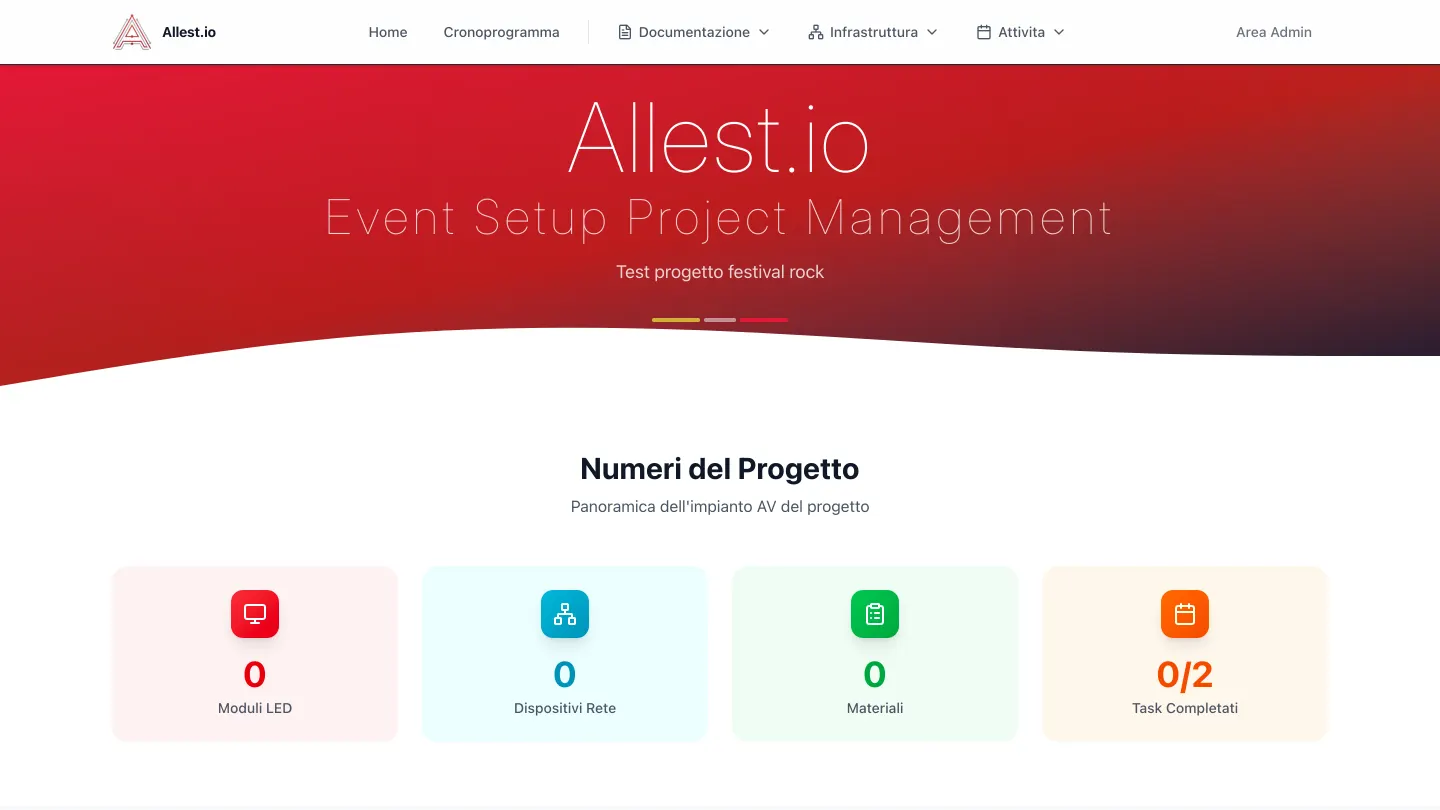
The ten modules
| Module | The question it answers | What it holds |
|---|---|---|
| Inventory | Where is this item and who has it? | Equipment with categories, venues, flight cases, allocations |
| Schedule | What has to be done tomorrow and where do we stand? | Tasks by phase, status, drag and drop, PDF export |
| Project diagrams | What is connected to what? | Interactive editor for signal connections (HDMI, SDI, Cat6, fiber) with automatic layout |
| Network | What address does this device have and on which VLAN? | Devices, addresses, VLANs and a topology view |
| LED Wall | How many panels are needed and how are they laid out? | Screen specifications, panel allocation, floor plans |
| Operational notes | What is not working and who is on it? | Issues with priority, status and area |
| Calls | What did we decide in yesterday's meeting? | Transcripts and summaries of operational meetings |
| Project photos | What did it look like before the load-out? | Site gallery with compression and links to tasks |
| Renders and tours | How is it supposed to look? | Embedded 3D images and virtual tours |
| Contacts | Who do I call about audio? | Directory of the project crew |
The signal flow diagram, the module that convinces people
On site the signal diagram lives on a hand drawn sheet that stops matching anything after the third change. In Allestio the connections are data: source, destination, cable type. The editor draws them with automatic layout, colors the lines by signal type and lets you move, group and hide nodes. The same data feeds the "what is connected to this device" search.
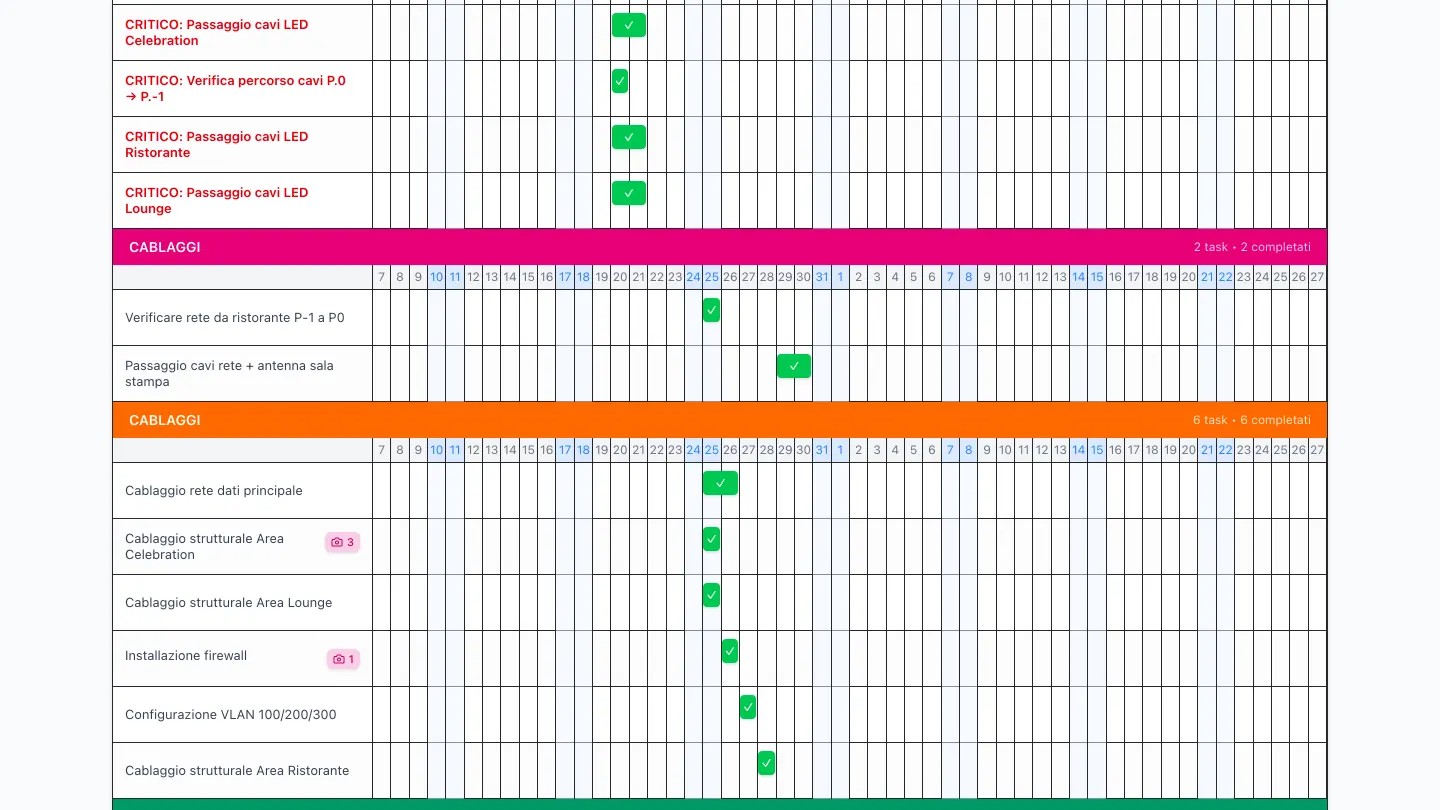
Schedule: tasks by phase, with progress and attached photos.
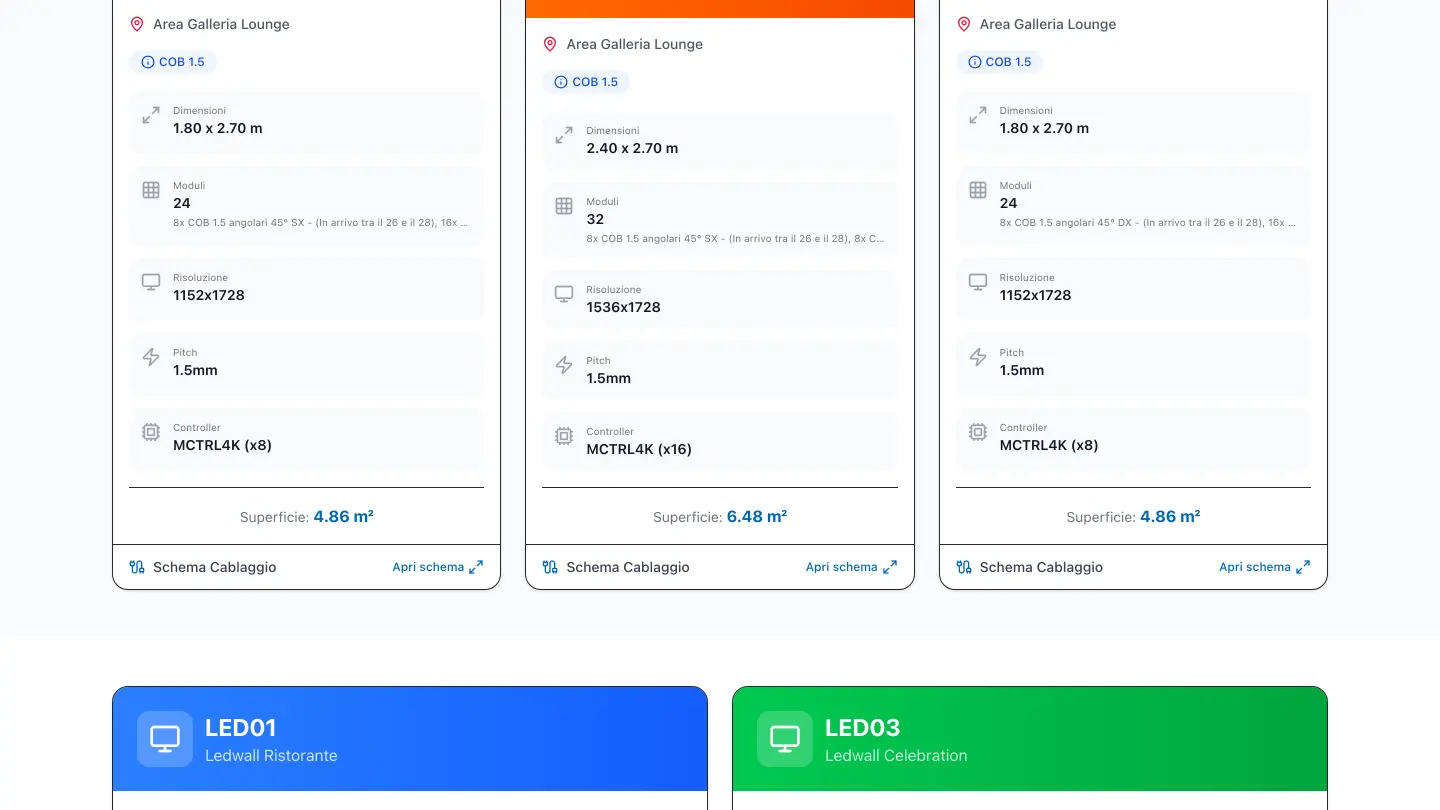
LED screens: dimensions, panels, resolution and cabling diagram.
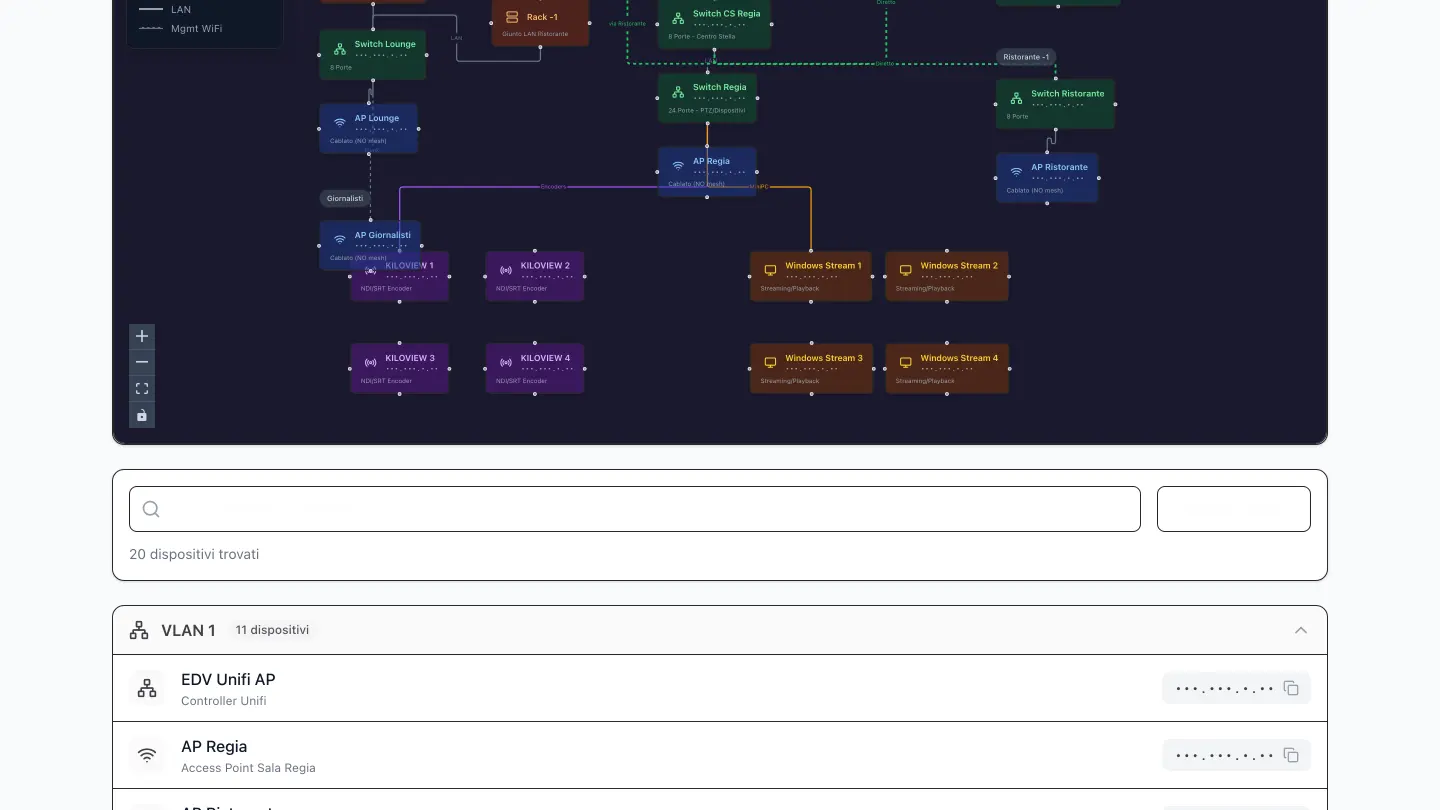
Network: device topology and list by VLAN.
Asking instead of searching
The platform has an assistant you write to in plain language. It is not a model answering from memory: every answer comes from queries against that project's data, and the rule it works under forbids it from producing a technical figure on its own. If the data is not there, it says so.
What people actually ask it
- Where a piece of equipment is and who it is currently assigned to.
- What is planned on a given date, with the status of that day's tasks.
- The details of a device or a screen: network address, specifications, location.
- The path a signal takes from a source to a destination, with the diagram drawn into the answer.
- Opening a note or a task and updating its status, without leaving the conversation.
This is the feature that changes the pace on site: someone with their hands full does not walk through six menus to find something, they ask for it. The assistant introduces itself as one, because whoever writes to it has to know they are talking to an artificial intelligence system and not to a colleague. That is what article 50 of the AI Act requires, and we cover it in our guide (in Italian).
On site, from a phone
People work from a phone on site, and the network in exhibition halls or technical rooms is often slow or missing. That is why the screens are built for a small display and photos are compressed on the device before they are uploaded, so an upload starts even on a weak connection. Offline use is present in the code but does not appear to be active on the published instance: until it is, this page does not promise it.
The technical decisions: isolating data, twice
Software used by different companies has to guarantee that one company's data never shows up in another's. Allestio does it on two levels: every organization has its own database, and inside each database every row belongs to a project. It is the most expensive decision in the project and the one that makes it sellable.
- One database per organization When an organization is created, the platform creates a dedicated database for it through the provider API, and a central catalog keeps the list of organizations, projects and templates. Two clients' data does not even share a connection. The downside is the complexity of migrations, which have to be applied to every database: a script runs them in sequence.
- Every row knows which project it belongs to An organization holds several projects, and twenty nine tables out of thirty carry the project identifier as a required column. Every server action takes the project context as its first parameter and every query filters on it: a list of categories or cable types cannot show ones from another project by mistake. A code review found and closed three places where the filter was missing.
- Paths that state the context Every page lives under /organization/project: the context is in the address, not in a cookie that can go stale. Anyone opening a link always knows which project they are looking at, and the middleware protects the admin areas on the same pattern.
- Configuration, not code Project name, dates, venue, coordinates, virtual tour, active modules and their order are settings saved per project and edited from a panel. The rule we set ourselves during the cleanup is that no proper name may appear in the code again.
Choosing between one database per client and a shared database is not obvious and depends on the kind of clients you have: we wrote about it in a dedicated note, Multi-tenant SaaS or separate instances, where Allestio and LeavePilot are the two opposite examples.
The real status and what is missing
Allestio works, it is in use on a demo project and it has the architecture to host different organizations. It does not have subscriptions, billing or self service signup yet: that is why it is not on sale, and why we say so.
- 10
- modules you can switch on per project (menu and home page adapt)
- 30
- tables, 29 with the project identifier (isolation checked in review)
- 1
- database per organization (created automatically at signup)
- 0
- paying customers (subscriptions in development)
The next steps, in order
- Subscriptions and recurring billing, with a trial period.
- Self service signup for organizations and user invitations with roles.
- Project templates for the three most common cases: AV installation, trade show, event.
- Reporting and collaboration with outside suppliers on limited permissions.
Technologies used
Choices made for a product that has to host different companies, be used on site from a phone and grow without rewrites.
Application
- Web application
- Built for phones too
- Assistant over the project data
Data
- Managed relational database
- Data separated per organization
Diagrams and files
- Interactive connection editor
- PDF export
- Separate file storage
- On-device photo compression
Operations
- Continuous publishing
- Managed environments
Frequently asked questions
Can I buy Allestio yet?
Not yet. The platform works and can be tried on a demo project, but subscriptions, billing and self service signup are still in development. If you work in the sector you can ask us for a demo on a real project of your own: it is free, and the feedback helps us set priorities.
Who is it for?
For AV rental and installation companies, event agencies and trade show and exhibition builders: anyone who has to coordinate equipment, cabling, network and tasks on a temporary site that goes up and comes down. Modules are switched on per project, so a company that never touches LED walls does not see that module.
How is data kept separate between one company and another?
Every organization has a dedicated database, created automatically, and inside the database every row belongs to a project. Queries always filter by project and every page states in the address which organization and which project are being viewed. It is the maximum isolation pattern, chosen because the clients are companies and not individual users.
What happened to the original tool?
It was split from the Allestio code on 28 February 2026 and the event data and references were removed from the platform: more than two hundred references across some fifty files. Allestio holds no data from that project. What stayed is the experience we got there.
Can I have similar software built for my own sector?
Yes. The road from a tool for one case to a configurable platform is the one we follow on client work too: you start from the problem of a real project, build the tool that solves it, then decide whether and how to generalize it. The page on SaaS platforms explains how we work and the page on costs gives the ballpark figures.
Written by Maximilian Giurastante
Founder and software developer, MAXYMIZE. Designs and builds SaaS platforms, custom business software and automations with language models. Over twenty years as a project leader in technology, audio and video systems integration.
Do you build trade shows, events or AV installations?
Try Allestio on a real project of your own: the demo is free, it takes an hour and your feedback decides what we build next.